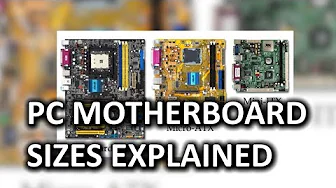
PC Motherboard Sizes as Fast As Possible
Your rating
Reactions
Description
ATX, mATX, mITX, eATX - All of these are different sizes can be confusing and this video explains what's up with each of them! Sponsor message: Squarespace is the easy, affordable way to create a beautiful, functional website for your blog, store, portfolio, or pretty much anything else! Try it out for free, and if you like it,
Promos
check out the link below Sponsor Link: squarespace.com - Offer code TECHQUICKIE1 to save 10% Guys I'm aware of the buzzing in the audio... Something was interfering with my mic... Nothing we can do about it :(
AI Overview
The video begins with an explanation of the ATX family of motherboard standards, focusing on physical and electrical compatibility with cases and power supplies. It clarifies that ATX stands for Advanced Technology Extended and describes how ATX motherboards come in multiple flavors such as standard ATX, micro ATX, extended ATX, and XL ATX, with mini ITX treated as a smaller, interoperable variant. The host explains compatibility rules: a case that fits a larger motherboard will accommodate a smaller one, while smaller boards require appropriate cases, and XL ATX has specific case considerations. The segment then details typical connector configurations, noting common 24-pin and 8-pin power connectors, and mentions how higher-end boards may include additional CPU or auxiliary power connectors to support multi-GPU setups. It also covers expansion capabilities, noting that ATX sizes can support three- or four-way graphics configurations in suitable cases, and discusses RAM slot counts and port availability across the different form factors. Throughout, the speaker emphasizes practical guidance for choosing a motherboard based on intended use, number of GPUs, and future upgrade plans, with occasional remarks on performance expectations and price ranges for each size. The section concludes with a reminder about power supply compatibility and a segue into the sponsor segment for Squarespace, followed by a description of Squarespace as a tool for building and hosting websites with a code for a discount, along with a closing encouragement to like, dislike, comment, and subscribe for more fast-paced content.
Topics · technology · computer-hardware · education
Questions answered
- What does ATX stand for in motherboard terminology?
- ATX stands for Advanced Technology Extended.
- Which motherboard size is the smallest common form factor mentioned, and what is its typical limitation?
- Mini ITX is the smallest common form factor mentioned, typically with up to two memory slots and a maximum of one expansion card.


