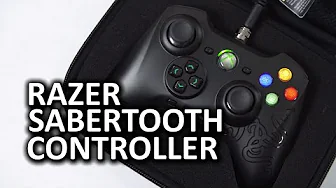
Razer Sabertooth Wired Xbox 360 and PC Controller
Your rating
Reactions
Promos
Luke took a look at the Razer Sabertooth Xbox 360 and PC wired controller. Regular Xbox 360 controllers are a mainstay in a lot of PC gamers' arsenals, and are much more affordable than the Sabertooth... Do the extra features justify its high price? HighLANder shirt: teespring.com (Available until August 3) Sponsor link: linustechtips.com Pricing & discussion: linustechtips.com Support us: linustechtips.com Join our community forum: bit.ly twitter.com @LinusTech Intro Screen Music Credit: Adhesive Wombat -
Channels and socials
Check out his channel here: youtube.com Outro Screen Music Credit: Approaching Nirvana - Sugar High youtube.com
AI Overview
The Razer Sabertooth Wired Xbox 360 and PC Controller is presented as a premium wired option that supports both Xbox 360 consoles and PC, with an emphasis on its onboard OLED screen and detachable, braided cable. The speaker walks through the hardware and design choices that set it apart from stock controllers, highlighting the two profiles stored on the device, the simple setup on PC via automatic Windows driver detection, and the absence of reliance on Razer Synapse software. Attention is given to the OLED interface, which enables quick profile switching and settings adjustments like rumble, backlight, and a testing mode to verify analog stick precision. The reviewer discusses the physical quality, including the screw-on detachable cable, and notes practical benefits for travel and cramped spaces, while also covering the six back buttons and how they can be bound in program mode. The video then covers user considerations such as durability, the limitation that rebinding is not fully independent, and the general impression that the Sabertooth is a premium product with meaningful, but sometimes debated, value versus standard controllers. The closing portion invites audience input on long-term durability and personal experiences, and encourages engagement across platforms, channels, and merchandise. In practical terms, the video demonstrates setup, customization, and use cases for both casual and more demanding players. The reviewer emphasizes that the controller is not wireless and can operate with a 2.5 mm microphone jack, expanding its functionality for some users. They also compare usability to other controllers, such as the Onza, while noting the integration of a backlit OLED screen that provides quick feedback and configuration options without software overhead. For potential buyers, the summary highlights the importance of considering price against feature set, including the robust build for travel, the two onboard profiles, and the challenge of fully independent macro bindings. Overall, the video aims to equip viewers with practical expectations about performance, durability, and the value proposition of the Sabertooth in a PC-gaming and console ecosystem.
Topics · hardware · gaming peripherals · pc gaming · console gaming
Questions answered
- Does the Razer Sabertooth work on both Xbox 360 and PC without software, and how is the setup process?
- Yes, it works on Xbox 360 and PC. On PC, Windows auto-detects the driver and configures the device without needing Razer Synapse software.
- Can you customize button bindings independently on the Sabertooth, and how does program mode work?
- You can bind multifunction buttons to other keys, using program mode by holding the desired button and pressing the target button. However, bindings are not fully independent; they must route through another button on the controller.
- What are the main hardware features highlighted, and is the controller wireless?
- Key features include an OLED screen with two onboard profiles, a detachable braided cable with a screw-on connector, six back buttons, and a 2.5 mm microphone jack. The controller is wired only, not wireless.






