DIY Networking Wall - A renter's solution!
Your rating
Reactions
Channels and socials
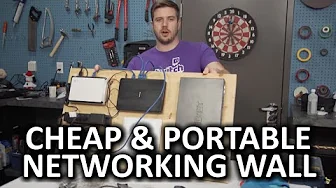
So, I want to have a badass networking wall in my house, but I rent and my landlord won't let me screw a bunch of crap into his wall... But I think I found a solution! Ting link: linus.ting.com Corsair link: linustechtips.com Pricing & discussion: linustechtips.com Support us: linustechtips.com Join our community forum: bit.ly twitter.com @LinusTech Intro Screen Music Credit: Title: Laszlo - Supernova Video Link: youtube.com iTunes Download Link: itunes.apple.com Artist Link: soundcloud.com Outro Screen Music Credit: Approaching Nirvana - Sugar High youtube.com Sound effects provided by freesfx.co.uk
AI Overview
The video presents a practical solution for a renter who wants a centralized networking setup without drilling into walls. The creator begins by acknowledging the challenge of not being allowed to screw equipment directly into the wall, and thus proposes mounting all networking gear on a portable board that can lean against the wall. He outlines the components involved, including a fiber modem, a router, an access point, a switch, and a power bar, and explains the need for more outlets and better cable management. The plan is to assemble the board, lay out the devices, shorten cables where possible, and label everything so each device has a clear place and function. He emphasizes the goal of a tidy, transportable solution that can be moved if he relocates, preserving the ability to unplug and relocate the entire setup. The narrative sets up a pragmatic, non-destructive approach to improve home networking in a rental situation, balancing functionality with landlord constraints. Throughout, the viewer is guided through the incremental steps from layout to execution, with a focus on avoiding wall damage while achieving a clean, organized result. The finale signals a completed project and invites engagement from the audience through sharing personal builds and experiences on the community forums.
Topics · technology · diy · networking · home_improvement
Questions answered
- Why does the creator choose a portable board instead of mounting devices directly to the wall?
- Because the creator rents and cannot drill or screw into walls, so he mounts all gear on a large board that can lean against the wall and be moved if needed.
- How is the networking gear organized and secured on the board?
- He lays out the router, access point, modem, and switch, uses a power bar for power, shortens cables, and secures them with velcro, while labeling each device for easy identification.