A gimmick worth buying - AM 65 'Less'
Your rating
Reactions
Description
Check out the Angry Miao Am 65 Less Wireless Keyboard: lmg.gg
Promos
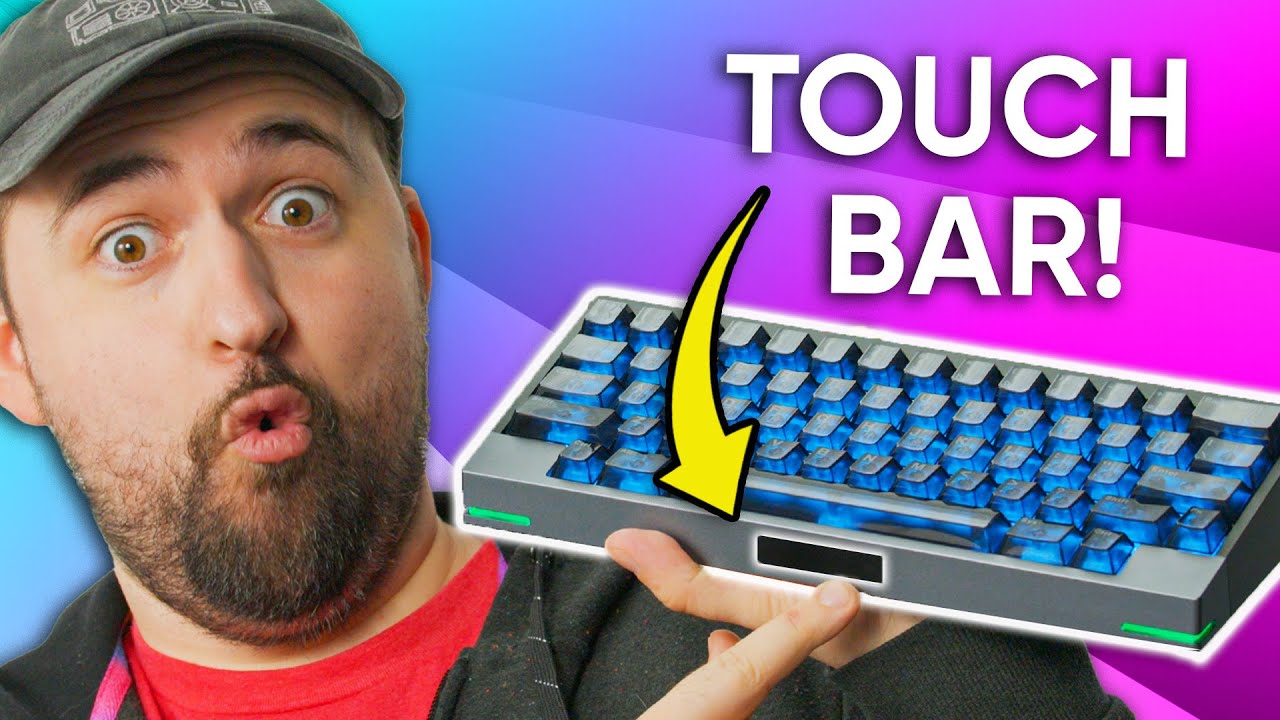
Check out the Vessi StormBurst and their other styles at vessi.com Use code SHORTCIRCUIT for 15% off your entire order and free shipping. Cybertruck, Super Famicom, Netflix. What do these all have in common? Angry Miao made a keyboard based on them! With fewer buttons than the average 65% keyboard, AM came up with an interesting way to keep your arrow keys without taking up space, a sweet touch bar! We had Plouffe take a look to see if this is a worthy replacement or if you should stick to regular physical keys.
Check out the Angry Miao Cyberboard Wireless Keyboard: lmg.gg Purchases made through some store links may provide some compensation to Linus Media Group. Want us to unbox something? Make a suggestion at lmg.gg ► GET MERCH: lttstore.com ► COME TO LTX 2023: lmg.gg ► GET EXCLUSIVE CONTENT ON FLOATPLANE: lmg.gg ► AFFILIATES, SPONSORS & REFERRALS: lmg.gg ► OUR WAN PODCAST GEAR: lmg.gg FOLLOW US ELSEWHERE --------------------------------------------------- Twitter: twitter.com Instagram: @shortcircuityt TikTok: @linustech Facebook: @ShortCircuitYT CHAPTERS --------------------------------------------------- 0:00 Even LESS keyboard 0:39 Unboxing the keyboards 2:46 Design impressions and unique features 6:00 Sponsor - Vessi 6:30 Switches, flex, and RGB lighting 9:31 Typing sound/feel 10:35 Testing the touch bar 13:28 Pricing and overall thoughts 14:46 Outro
AI Overview
This video presents an in-depth unboxing and first impressions of the Angry Miao AM65 Less wireless keyboard, a seemingly smaller variant that preserves a few features from its larger 65% peers. The host starts by noting there are two colorways, Laser and 8-Bit, and highlights the distinctive front LEDs and a built in touch bar that promises arrow-key functionality without extra space. The unboxing reveals premium packaging, an included cloth, and a foam-filled enclosure with leaf-spring mounting that supports a customizable, adjustable keyboard chassis. Early commentary focuses on the physical heft of the CNC aluminum build, the weight being lighter than expected, and the absence of a cable in the initial package. The host also clarifies that the keyboard is still early in its development and pricing is not disclosed at the moment, setting expectations for a premium price point given the custom features and materials. Throughout the segment, attention is paid to the potential of the touch bar to replace arrow keys, a feature that could redefine how users navigate and control media or documents while typing. The overall takeaway from the first minutes is that this is a niche, design-forward device that blends a nostalgic aesthetic with modern, modular hardware, and aims to balance form with a highly experimental input method.
Topics · technology · hardware · product-review · unboxing
Questions answered
- What makes the AM65 Less different from a standard 65% keyboard?
- The AM65 Less replaces traditional arrow keys with a touch bar that functions as an on-board input area for navigation, media controls, and other commands using software customization.
- Is the keyboard considered ready for purchase or still early access?
- The video notes the product is early in development with Version 0.1 and that price details were not disclosed at the time, suggesting it is in a prototype or pre-order stage.
- Do reviewers think removing arrow keys is practical for everyday tasks?
- Most viewers and the reviewer themselves express skepticism, arguing that arrow keys are indispensable for many tasks and that the touch bar may slow interactions rather than speed them up.