HomeFeatured videos and new releasesBrowseLatest videos, playlists, and topicsCreatorsYouTube creators and their videosNewsHeadlines from publishers' feedsHistoryResume recently watched videos
Theme
Language
AccountAccountSign in
PrivacyCookiesTermsAboutContactRemovalMethodology
Account
Sign in
Western Digital Blue 1TB SATA3 6Gb/s Hard Drive Unboxing & First Look Linus Tech Tips
Video · 0:00

Western Digital Blue 1TB SATA3 6Gb/s Hard Drive Unboxing & First Look Linus Tech Tips

Linus Tech Tips@LinusTechTips•203.1K views•Feb 16, 2011•3:23

Your rating

Rate this video from 1 to 5

Reactions

Reactions to this video

Share

WhatsAppXReddit
Source
YT
Views
203.1K
Subscribers
16.9M
vs. channel typical
0.4x
Likes per 100
0.8
Comments
346

Description

ncix.com Interfaces are always being updated. Now we finally have a mainstream hard drive that runs at SATA3 6.0Gb/s!

Start

AI Overview

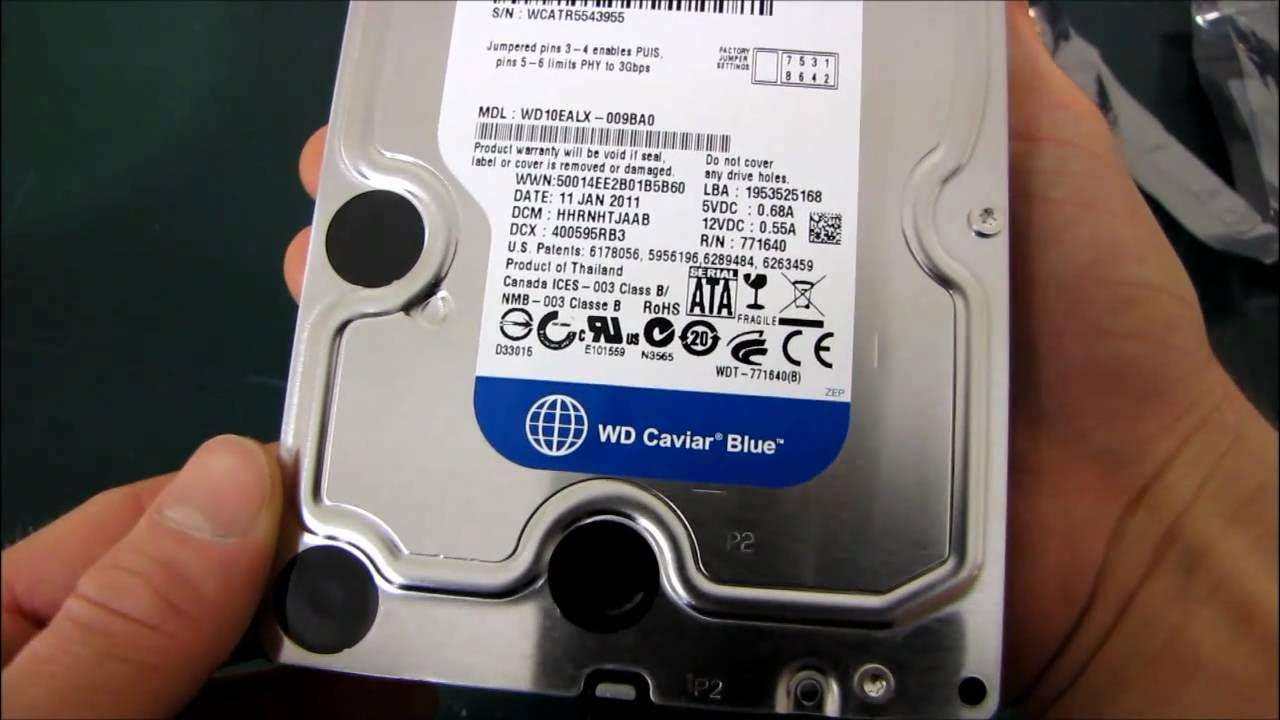
This video presents an unboxing and first look at the Western Digital Caviar Blue 1TB SATA 6Gb/s hard drive. The host explains that although this model sits below WD's Black performance line, it still includes the latest technologies and is rated for 7200 RPM operation. A key focus is the drive’s SATA 3 6Gb/s interface, and the host notes that in systems with slower SATA ports the drive will run at the slower speed. The unboxing portion reveals the physical drive label with model details and acknowledges the need to follow Advanced Format installation steps. The host mentions jumper pins five and six as a means to limit the drive to 3Gb/s for compatibility with older motherboards. Guidance is given to verify if the drive is Advanced Format via the label and to visit Western Digital’s site for any additional installation steps. The closing segments encourage viewers to subscribe to Linus Tech Tips for more unboxings, reviews, and computer content, rounding out a concise, practical first look at the WD Blue 1TB drive.

Topics · technology · hardware · unboxing · storage · consumer electronics

Questions answered

What is the key storage technology highlighted in the WD Blue 1TB drive?
The drive uses a SATA 3 6Gb/s interface with 7200 RPM performance, and it is noted as Advanced Format requiring specific installation steps.
How can the drive be made compatible with older SATA ports?
By jumping pins 5 and 6 to limit the drive to 3Gb/s, improving compatibility with older motherboards.


More from Linus Tech Tips

  • I am One Failure Away From Data Loss
    22:44

    I am One Failure Away From Data Loss

    56.2K views•23 hours ago
  • The $40 GTA 6 Gaming Setup is MUCH Better Than You'd Think
    18:45

    The $40 GTA 6 Gaming Setup is MUCH Better Than You'd Think

    534K views•2 days ago
  • My Investment is on SALE
    1:42

    My Investment is on SALE

    305K views•2 days ago
  • You Were Right About my Braces
    15:09

    You Were Right About my Braces

    582.4K views•3 days ago

Related videos

  • M.2 As Fast As Possible
    6:13

    M.2 As Fast As Possible

    3.6M views•11 years ago
  • Don't buy the Wrong MacBook like me...  - M4 MacBook Pro
    13:06

    Don't buy the Wrong MacBook like me... - M4 MacBook Pro

    1.1M views•2 years ago
  • They promised me they fixed it... - ASUSTOR Flashstor Gen2
    14:49

    They promised me they fixed it... - ASUSTOR Flashstor Gen2

    288.2K views•2 years ago
  • Chromebook Pixel Unboxing & First Impressions!
    5:01

    Chromebook Pixel Unboxing & First Impressions!

    191.6K views•14 years ago
  • Unboxed: Intel X25-V 40GB SSD
    3:08

    Unboxed: Intel X25-V 40GB SSD

    16.7K views•17 years ago
  • Using Apple Vision Pro: What It’s Actually Like!
    37:19

    Using Apple Vision Pro: What It’s Actually Like!

    28.5M views•3 years ago

