Battlefield 3 Benchmarking Procedure Explanation
Your rating
Reactions
Description
You can use this as a guide for how to benchmark Battlefield 3. Test your own hardware and see how it compares to what we're using! Read more & join our community forum: link coming soon. See our first video card round up using this test: coming soon!
AI Overview
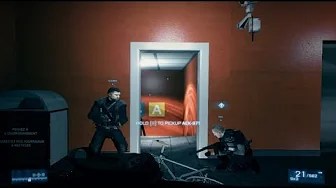
This video serves as a practical Battlefield 3 benchmarking procedure guide. It emphasizes that the presenter uses a personal rig and shows how frame rates can vary with different, non-standardized settings, while focusing on the method rather than producing exact performance results. A key portion of the walkthrough demonstrates starting the benchmark precisely when the player begins running after cutting a set of wires, and it explains how to manage in-game actions to minimize variability. The host discusses typical steps like performing a two-minute run through the Comrades level on the Ultra/Highest preset, and then proceeding with repeatable actions such as clearing enemies from fixed positions, moving between cover points, and finally shooting windows to avoid late-stage inconsistencies caused by game events. The video also notes the importance of consistent timing by avoiding lengthy in-game delays and explains how fraps recording can introduce minor frame dips. In addition to the procedural tips, the guide invites viewers to compare their hardware against the tested rig by using a shared forum thread for standardized benchmark results, promoting reproducibility across different graphics cards and systems. The overall aim is to provide clear, repeatable steps that viewers can follow to benchmark their Battlefield 3 setup and to facilitate meaningful comparisons across configurations.
Topics · science & technology · computer hardware · video gaming · benchmarking
Questions answered
- What is the recommended starting point for the Battlefield 3 benchmark in this guide?
- Start the benchmark exactly as you begin running after you cut the wires near the waypoint, so the run begins the moment you start moving.
- Why does the video mention potential frame dips during the test?
- Frame dips can occur due to recording with Fraps while running the benchmark, causing brief performance drops that should be accounted for when interpreting results.






