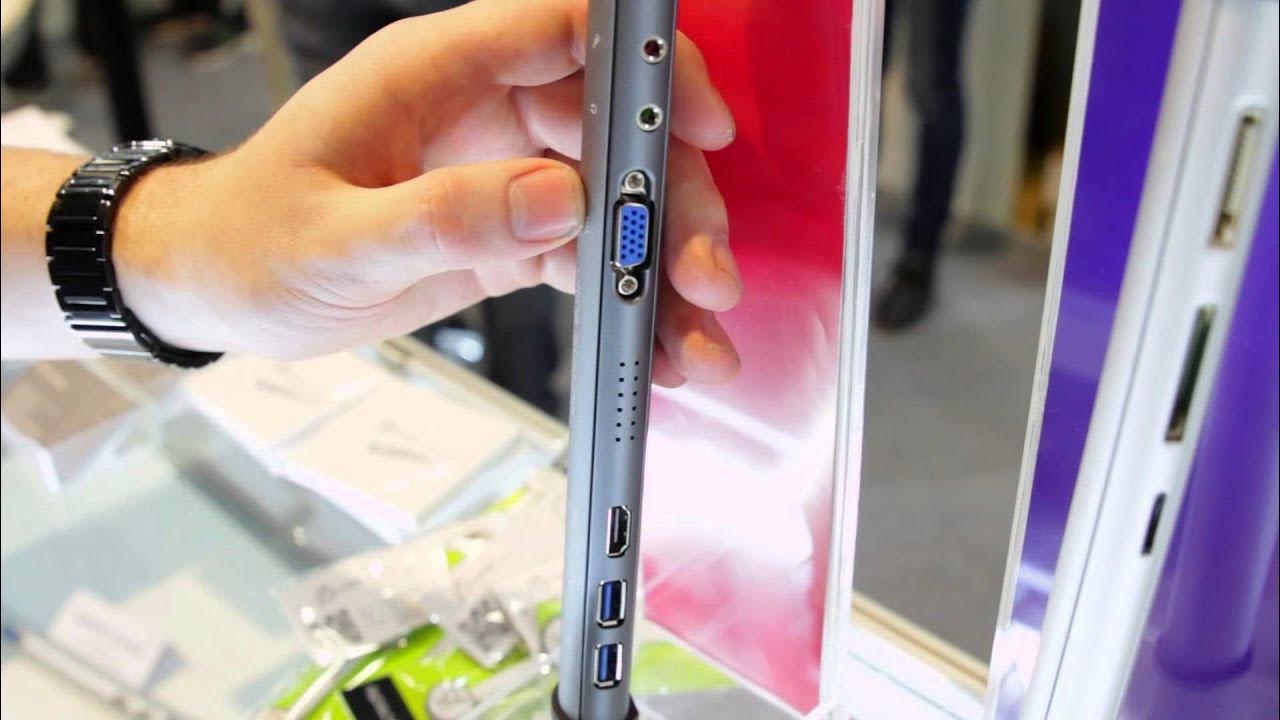
j5 Create Booth Featuring Ultra Station JUD 500 - Computex 2013
Your rating
Reactions
Promos
I Googled it and apparently "wormhole" technology is a keyboard/mouse sharing tech that j5 uses: j5create.com WD is posting daily updates from the show to their landing page here: wdc.com Sponsor Link 1: 15% off internal hard drives until June 16th, 2013 (US & EU only) with promocode "COMPUTEX2013" - wdstore.com & bit.ly Sponsor Link 2: Corsair Vengenace gaming peripherals. Quality peripherals with legendary Corsair customer service - corsair.com Sponsor Link 3: NCIX is my favourite Canadian computer store. They're my bros (almost literally. I have family that works there). They also ship internationally now! - ncix.com Join our community forum: bit.ly twitter.com @LinusTech
AI Overview
Linus Tech Tips covers the Computex 2013 booth for j5 Create, focusing on the Ultra Station and the JUD 500 docking solution. The host explains the setup: a host USB 3 connection to the computer, a DC in power line, and a wormhole switch that links multiple peripherals to the laptop. A wide range of I/O options are demonstrated, including USB 3.0 charging, standard USB 3.0, HDMI, VGA, audio with mic, ethernet, USB 2.0, and the dedicated wormhole switch. The concept is presented as a convenient way to transform a laptop into a more productive desktop experience with minimal cable clutter, enabling an external monitor, keyboard, and mouse to be used with a single USB 3.0 connection. While the host notes that performance won’t match a full desktop due to only having one USB 3.0 lane, the potential to add peripherals, maintain ethernet connectivity, and drop a laptop into a near-desktop setup is emphasized as a compelling option for power users and professionals on the go. The segment closes with a call to subscribe for more Computex coverage and a tease of future demonstrations, highlighting the product's appeal to viewers seeking practical docking and expansion solutions for laptops.
Topics · technology · computers · gadgets · tech show · consumer electronics · product demos






