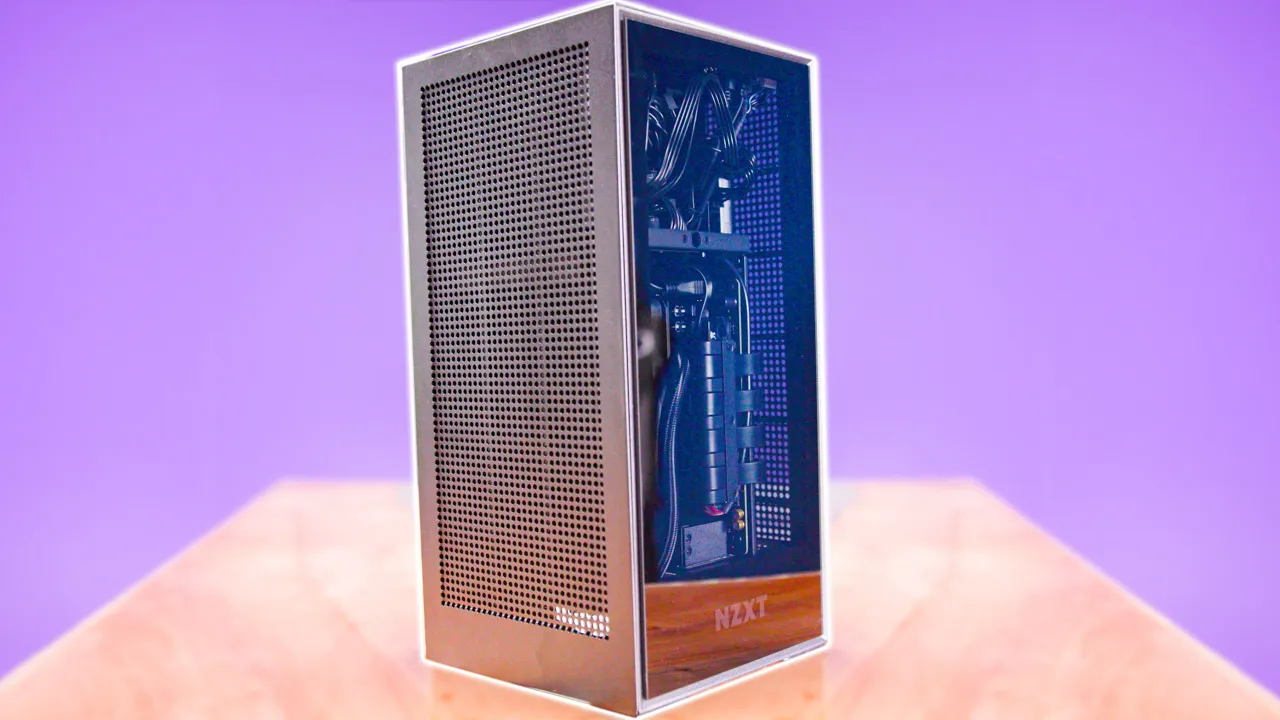
Building the Xbox Series X Rip-off PC
Your rating
Reactions
Description
Thanks to NZXT for sponsoring today's video!
Promos
Check out their new H1 Case at nzxt.co or get a BLD H1 PC Build at nzxt.co Linus builds a gaming PC in a case that looks kind of similar to the forthcoming Xbox Series X, the NZXT H1. It’s got an Intel 9900K and an RTX2070 Super for good measure, though Buy ROG STRIX Z390-I Motherboard On Amazon (PAID LINK): geni.us On Newegg (PAID LINK): geni.us Buy i9 9900k Processor On Amazon (PAID LINK): geni.us On Newegg (PAID LINK): geni.us Buy Vengeance RGB Pro On Amazon (PAID LINK): geni.us On Newegg (PAID LINK): geni.us Buy Sabrent Rocket NVMe PCIe M.2 SSD On Walmart (PAID LINK): geni.us On Newegg (PAID LINK): geni.us Buy RTX 2070 Super On Amazon (PAID LINK): geni.us On Newegg (PAID LINK): geni.us Buy Gaming Monitor On Amazon (Paid Link): geni.us On Newegg (Paid Link): geni.us Buy Gaming Keyboard On Amazon (Paid Link): geni.us On Newegg (Paid Link): geni.us Buy Gaming Mouse On Amazon (Paid Link): geni.us On Newegg (Paid Link): geni.us Purchases made through some store links may provide some compensation to Linus Media Group. Discuss on the forum: linustechtips.com Our Affiliates, Referral Programs, and Sponsors: lmg.gg Get Private Internet Access VPN at lmg.gg Get a Displate Metal Print at lmg.gg Get a 30-day free trial of Amazon Prime at lmg.gg Linus Tech Tips merchandise at lttstore.com Our Test Benches on Amazon: amazon.com Our production gear: geni.us Get your ticket to LTX 2020: ltxexpo.com Twitter - twitter.com Facebook - @LinusTech Instagram - @linustech Twitch - twitch.tv Intro Screen Music Credit: Title: Laszlo - Supernova Video Link: youtube.com iTunes Download Link: itunes.apple.com Artist Link: soundcloud.com Outro Screen Music Credit: Approaching Nirvana - Sugar High youtube.com
AI Overview
This video presents Linus and the Linus Tech Tips team unboxing and assembling a compact PC inside the NZXT H1 case, highlighting how the case ships with several key components pre-installed while still leaning into a traditional DIY build experience. The host explains the philosophy behind small form factor machines, noting what is pre-included and what the user still supplies, such as the motherboard, CPU, RAM, and storage. The setup emphasizes cable routing, modular GPU mounting, and magnetic dust filters, showing how pre-routed power cables and a compact all-in-one cooler simplify assembly. The narrative also covers practical considerations like panel removal, easy access to internals, and the intent to minimize clutter with internal cable management features. Overall, the segment frames the H1 as a safer, more approachable way to dip into PC building while retaining the customization benefits of a DIY build, concluding with a reflection on how this approach compares to other pre-built options. In the middle portion, the video dives into component installation, starting with installing a high-profile CPU cooler, followed by seating the 9900K CPU and Corsair RAM. The host demonstrates careful mounting, alignment of the CPU socket triangle, and the handling of backplates, spacers, and PCIe risers, all while noting the system’s compact constraints. With the motherboard mounted, the team proceeds to install an NVMe SSD in a front shield location to optimize airflow and thermal considerations, then players step through ensuring all motherboard connectors are correctly seated. The build progresses with mounting a RTX 2070 Super, securing it with bottom screws, and addressing potential fit issues from a bowed motherboard tray, which the host mitigates with careful pressure and alignment. The commentary also touches on user experience, asking beginners if the process looks accessible or overwhelming and offering reassurances based on their procedural approach. Toward the latter half, the build test focuses on booting the system and troubleshooting, illustrating a process of checking PCIe connections and addressing possible cable issues before concluding with a software benchmark. The host runs Shadow of the Tomb Raider and a stress test, commenting on thermal performance, frame rates, and the influence of the CPU turbo capabilities on game downloads and general performance. The testing results reveal temperatures that stay in a safe range and a cooling strategy that maintains positive pressure within the case, supporting the claim that the NZXT H1 design can support powerful components without overheating. The closing remarks compare this build path to other water-cooling projects, praising the efficiency and accessibility of a guided, modular kit while noting personal preferences for more traditional builds. The video ends by suggesting viewers consider this approach for safer, quicker DIY builds and pointing to related content for those curious about alternative cooling solutions.
Topics · technology · hardware · diy · computer_building · small_form_factor · case_modding
Questions answered
- What is the NZXT H1 case and what does it include out of the box?
- The NZXT H1 case is a compact small form factor chassis that includes a pre-installed power supply, an all-in-one CPU cooler, and a pre-routed PCIe riser, while the user supplies the motherboard, CPU, RAM, and storage.
- What CPU and GPU are used in this build demonstration?
- The build uses an Intel Core i9-9900K and an RTX 2070 Super for demonstration.
- How is cable management addressed in this build?
- Cables are pre-routed with shortened runs, magnetic panels simplify access, and a PCIe riser is used with a protective design to keep cables from tangling.
- What are the key takeaways about safety and novice-friendliness?
- The host emphasizes that with proper instructions the build is approachable for novices, but also highlights potential risks with certain components and the importance of following safety precautions and troubleshooting steps.






