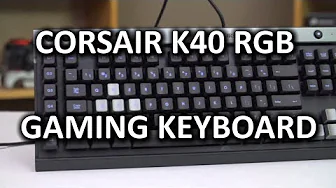
Corsair K40 RGB Backlit Gaming Keyboard
Your rating
Reactions
Channels and socials
My unboxing and review of Corsair's K40 RGB backlit gaming keyboard is here. It's a fairly. It's a competitive product in the market, and Corsair's software drivers have come a long way. Sponsor link: linustechtips.com Pricing & discussion: linustechtips.com Support us: linustechtips.com Join our community forum: bit.ly twitter.com @LinusTech Intro Screen Music Credit: Adhesive Wombat -
Check out his channel here: youtube.com Outro Screen Music Credit: Approaching Nirvana - Sugar High youtube.com
AI Overview
The video opens with an overview of Corsair's K40 RGB backlit gaming keyboard, highlighting its key specifications and feature set. The presenter notes a 16.8 million color backlight with cycling and pulsing modes, as well as six programmable G keys and three layers of functionality accessible via software or on-the-fly using the Mr Button. Onboard memory allows saving profiles directly on the keyboard, and macro programming is described as real-time and smooth, without quirky behavior. The backlight configurator is praised for its interactivity, though the review points out that the brightness is not exceptionally high and that, in practice, the color options are a subset of the theoretically available 16.8 million colors. The device is positioned as a competitive membrane-style keyboard in a price range with several alternatives, and the software evolution over the years is acknowledged as now fairly capable for managing color schemes and macros. The layout is described as solid with dedicated media keys and a Windows lock, plus a brightness control that scales from off to a strong level, while a few layout quirks are noted, such as the F keys being a bit too close to the number row. The reviewer compares the K40 to other options in the same segment, balancing the value proposition against Corsair’s own line and the broader market, and concludes that while the K40 is capable and feature-rich, it may not feel enthusiast-driven enough for some buyers. Overall impressions emphasize competitive features for a rubber-dome keyboard, with acknowledgment of Corsair’s innovation in RGB backlighting and the potential appeal to budget-minded enthusiasts, tempered by questions about whether this particular model fully embodies the brand’s more aspirational products. In the conclusions, the reviewer reflects on the K40 as a solid but not spectacular option, noting that it sits between the K30 and K50 in Corsair’s lineup and may be chosen for value rather than top-tier keyboard experiences. The discussion pivots to the broader ecosystem, including the software’s improving capabilities and the on-board memory’s convenience for portable setups. While some viewers might be hoping for a fully featured RGB mechanical keyboard, the K40 remains a viable entry point for gamers who want customization without sacrificing a more traditional rubber-dome feel. The segment closes with final thoughts on design, accessibility of macro programming, and the ongoing anticipation for Corsair’s higher-end RGB mechanical offerings, inviting viewers to weigh price, features, and personal preference when considering a purchase.
Topics · peripherals · computer_hardware · gaming
Questions answered
- What are the standout features of the Corsair K40 RGB backlit keyboard?
- Key features include 16.8 million color backlighting with cycling and pulsing modes, six programmable G keys with multi-layer functionality, onboard memory for saving profiles, on-the-fly macro programming via the Mr Button, and dedicated media controls with a Windows key lock.
- How does the reviewer view the K40 in relation to the competition?
- The reviewer sees the K40 as a solid, competitive option in its price range, especially for those who prefer membrane keys, but notes it may not satisfy enthusiasts seeking an RGB mechanical keyboard or the most aggressive backlighting. They compare it to other Corsair models and non-Corsair options, highlighting value and feature parity rather than top-tier innovation.






