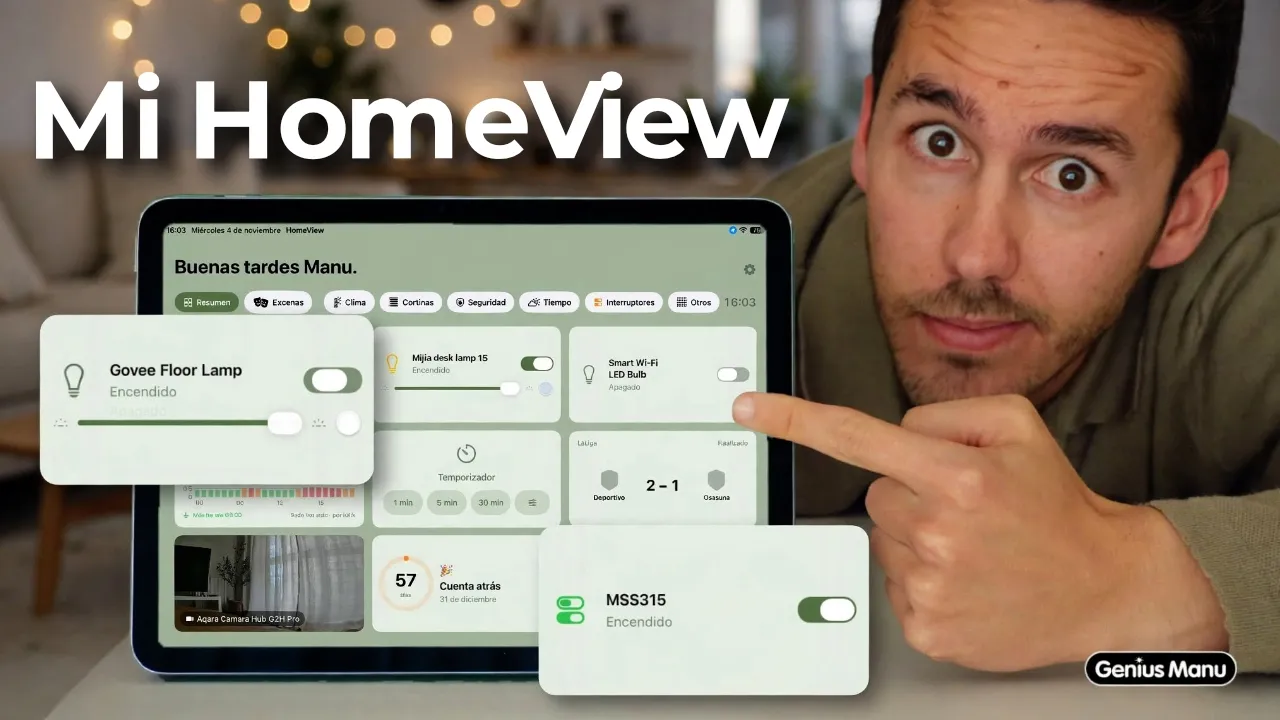
He creado mi propio HomeView de Apple con un iPad (y funciona genial) 🙌
This video also has English audio (auto-dubbed). In the player, open Settings → Audio track and choose English.
Your rating
Reactions
AudioSpanish (original)Auto-dubbed: English, Arabic, Portuguese
Channels and socials
He creado una especie de HomeView pero con un iPad. Y es que Apple ha presentado HomeView, su nueva pantalla inteligente para el hogar, pero de momento no está disponible en España ni en México. Así que he decidido crear mi propia versión utilizando un iPad Air. En este vídeo te enseño cómo convertir un iPad en un centro de control para tu casa inteligente, con widgets, domótica, cámaras, música y mucho más. ¿Puede sustituir realmente al nuevo dispositivo de Apple? Vamos a comprobarlo. Espero que os guste este experimento. ___ ENLACES DEL VIDEO: 1. HomePad - apps.apple.com 2. SmartHome Dashboard - apps.apple.com 3. Wallpapers - whatsapp.com 4. Soporte MOFT para iPad - link.amazon ___ MI EQUIPO DE GRABACIÓN Y CREACIÓN - amzn.to MI OTRO CANAL SOBRE REALIDAD VIRTUAL/MIXTA - @NextManu_ ___ MIS REDES SOCIALES: Canal WhatsApp - whatsapp.com Instagram - @geni.usmanu X - x.com Amazon - amzn.to ___ LÍNEA DE TIEMPO: 00:00 - Homeview con iPad 00:33 - Requisitos 01:08 - Wallpapers 01:45 - HomePad 04:30 - SmartHome Dashboard 06:14 - Soporte 06:42 - Mejoras con el HomeView 07:46 - Conclusión ___
Contact
CONTACTO: Correo -
contacto @geniusmanu.com ___ *Algunos de los enlaces en esta descripción son enlaces de afiliados. Si compras a través de ellos, puedo recibir una pequeña comisión sin coste adicional para ti. ¡Gracias por tu apoyo! *Este vídeo puede incluir contenido protegido por derechos de autor cuyo uso no ha sido expresamente autorizado por su titular. Dicho material se utiliza con fines de crítica, comentario, análisis, educación y/o información, conforme a lo establecido en el artículo 107 de la Ley de Propiedad Intelectual de EE. UU. (uso legítimo o “fair use”), así como bajo principios similares contemplados en la normativa europea. Si eres el propietario de los derechos de alguna de las obras utilizadas y consideras que su uso no es adecuado, puedes ponerte en
contacto con nosotros para intentar resolverlo de forma amistosa.
AI Overview
The video shows how to turn an iPad into a home-control display as a workaround for Apple’s HomeView, which the creator says is not available in Spain or Mexico. The setup needs an iPad that can install App Store apps and a stand so it can be moved around the home. The creator demonstrates HomePad, a free app that uses accessories added in Apple’s Home app and lets users arrange control widgets, clocks, wallpapers, and screen settings. Its controls can turn lights and a lamp on or off and adjust light brightness. A second option, SmartHome Dashboard, offers a different layout, extra widgets, scenes, weather, and a free tier alongside a paid Pro version. The creator recommends switching the dashboard from two rows to three to fit more widgets.
Topics · science & technology · smart home · home automation · tablet computing
Questions answered
- How can an iPad be used as an Apple HomeView-style smart home display?
- Install a home dashboard app such as HomePad or SmartHome Dashboard, connect it to accessories in Apple’s Home app, arrange the controls and widgets, and place the iPad on a stand.
- What equipment is needed to make an iPad home-control hub?
- An iPad that can install apps from the App Store and a stand are the basic requirements. The iPad can be moved around the home for shared use.
- What can the HomePad app control on an iPad?
- HomePad can display Home app accessories as widgets, including controls for turning lights and other accessories on or off and adjusting compatible lights.
- What extra features does SmartHome Dashboard offer?
- Its widgets can include scenes, weather, countdowns, dates, lighting controls, live sports scores, energy prices, timers, and compatible security camera feeds. It has a free version and a paid Pro version.
- What Apple HomeView features are missing from an iPad dashboard setup?
- The iPad setup lacks HomeView’s person recognition, presence detection, smoke and carbon monoxide alarm detection, a panel for viewing up to nine cameras at once, and integrated audio.